Design Objective
Our design objective for this app feature was to create an educational aspect into Vimeo, an ad-free video platform. As design students, my group thought it would be extremely helpful to include tutorial based videos into Vimeo. We wanted to create an experience where if you were watching a video and wanted to learn a technique the creator used, Vimeo would recommend a tutorial in which you could learn that specific technique. We also wanted to expand on this thought and create a tutorials page in Vimeo, in case a user wasn’t looking for anything specific and wanted to browse unspecific tutorials. We want this app feature to be a reliable source for creatives and help expand their knowledge in different realms of the creative economy.
Our overall goal for this app feature is too inspire creatives, young and old, who are looking to expand their knowledge in the creative economy. We want people to utilize this feature for the greater good of creating.
Press Release
https://docs.google.com/document/d/1hZsTfSM8u3uFeUyKT6tb37vLIwgLPzKsLNaTAbxwm5w/edit?usp=sharing
Project Concept
We want this new feature to be a reliable source for creatives looking to expand their knowledge and learn new techniques they can use in the real world of design and the creative economy. The implementation of this feature would be included in your Vimeo account. There would be no added fees or charges, it would be linked to your existing Vimeo account.
User Research Synthesis
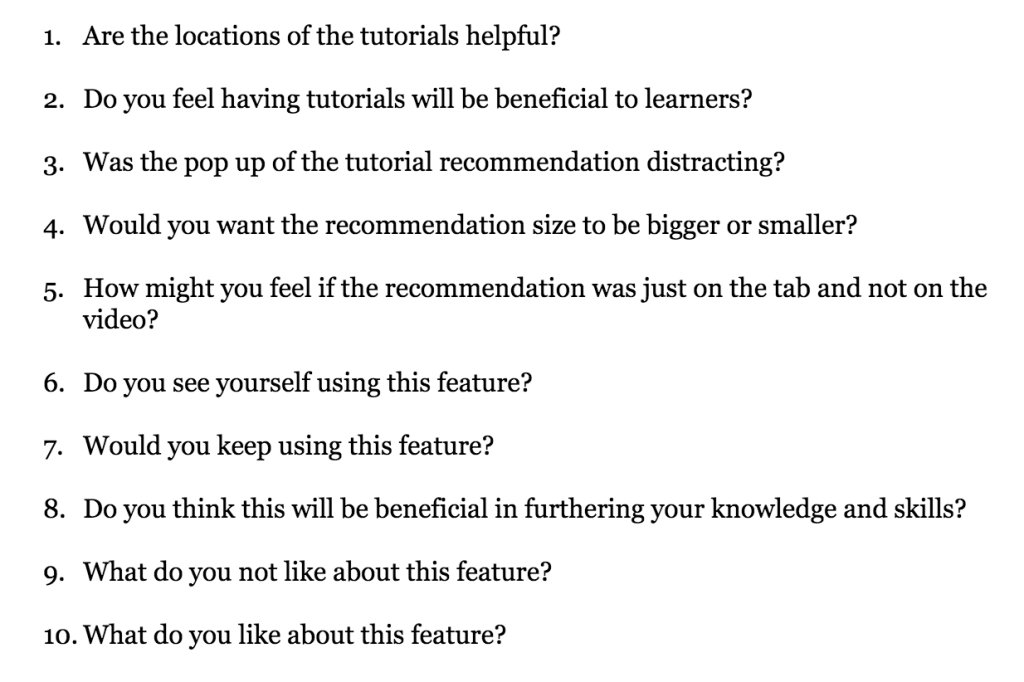
Our user research was done with a handful of students, both creatives and non-creatives, and also a designer in the field. We wanted to test our initial design to see if it reflected what we wanted to see. We wanted users to give their honest opinion about the whole idea and the initial app. We came up with a series of questions regarding their overall experience, their satisfaction with the app, and constructive criticism. A few examples of questions we asked include, Do you see yourself using this feature? How was your overall experience using this feature? Would you find tutorials beneficial to your Vimeo experience? etc. Based on our research we found that five out of five users would in fact use this feature if implemented into Vimeo. Our users also expressed that the feature would be very beneficial to their learning process. Although, we did find that some users experienced distraction with the pop-up tutorial’s appearing in the video’s. We got a lot of feedback from our users that really helped my group and I edit the feature in a way that would be successful for many users.
Proto Persona
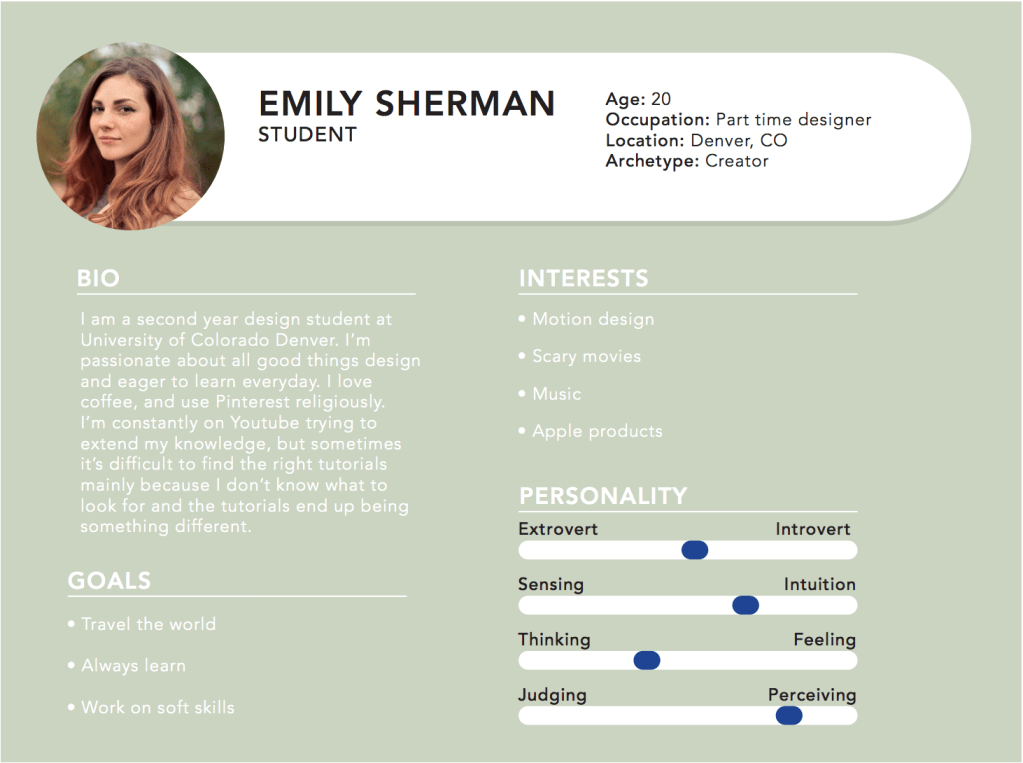
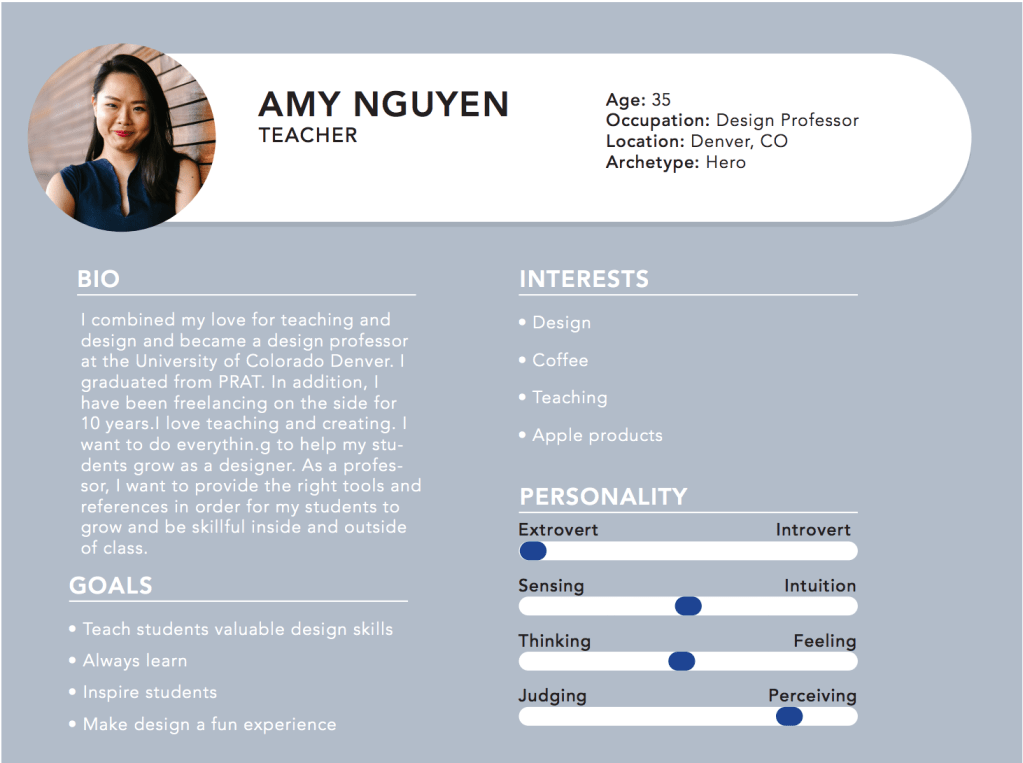
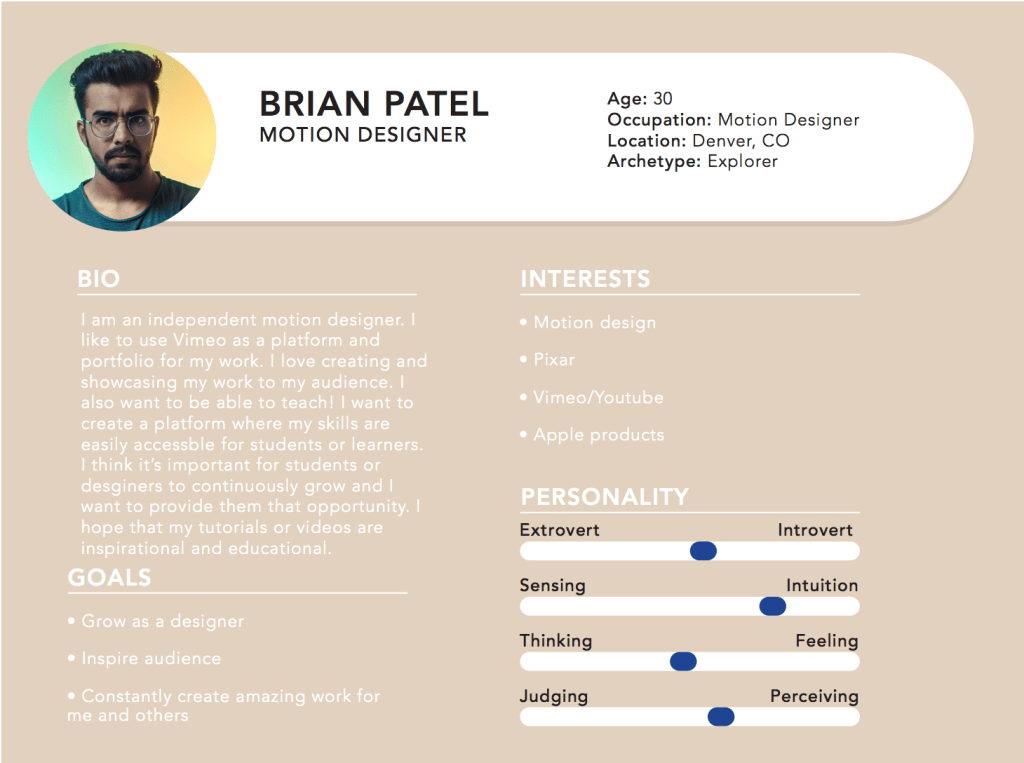
This feature is aimed for any creatives looking to expand their knowledge and the desire to learn new techniques. Our target audience ranges from creatives to non-creatives with the desire to learn new skills, ranging from young to old. More specifically it is aimed for students and designers that need a reliable source to find proper content and tutorial based videos that encourages growth within their design work. Since my group and I all fit into this category, we decided to think about our personal struggles with being a designers and trying to grow our skills. While discussing we all formed the same analysis that it is extremely difficult to find proper tutorials that genuinely help us. We also uncovered that we all had moments of watching a video and wanting to learn how to create the same effect, but simply not knowing what the effect was called leading us to search for it and not finding it. So, during our user research we decided to ask our users if they faced the same problems and most of them agreed. We noticed that this was a huge problem all creatives faced and it really helped to keep this in mind while designing. With that said, our users are creatives that are always looking to improve their skills and that struggle with finding the right resources to help them achieve this goal.
Competitive Analysis
Vimeo’s biggest competitor is Youtube, which is also a video sharing platform. While they are virtually the same concept, they are very different in reality. Both have mobile and desktop versions of their site. I will say that Youtube has more feature than Vimeo, they have their premiere feature and subscriptions. However looking at the type of users each independent has and what type of content is released on each platform varies quite a bit. Youtube caters to many different and diverse users, and while Vimeo is also quite diverse it has more of a mature community. As for the content, Youtube has limitless and unspecific content. Vimeo on the other hand has more refined content and is taken more seriously. For instance, many Vimeo users are professionals in the creative economy and put thoughtful work out there to get recognized. Vimeo is more of a professional experience compared to Youtube, for example Vimeo doesn’t have ads Whereas youtube does. Although these are only small differences, they make a huge difference in overall quality and professionalism.
User Journey Map
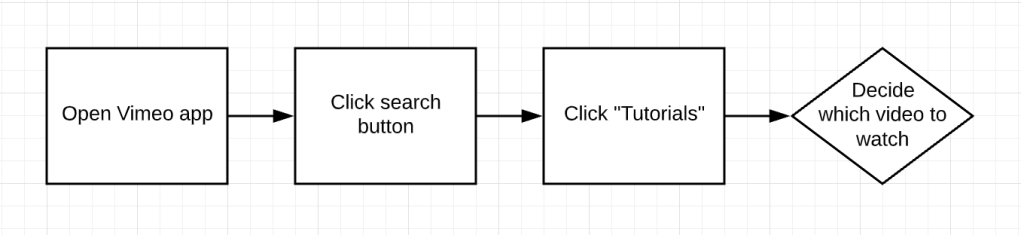
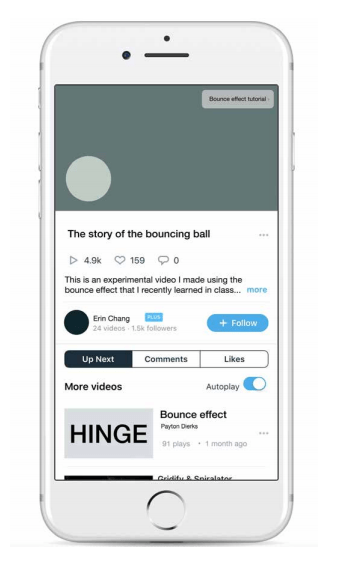
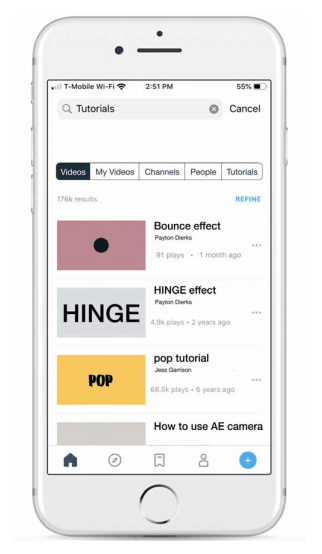
Because this is a feature within Vimeo everything in the stays the same, along with a few new additions. So, because we have two options for viewing tutorials I’ll start with how to search for tutorials. You’ll start by opening the app and seeing the homepage. Once you are in the homepage you can go to the explore page icon, and you will see a folder named tutorials. In there you can find countless unspecific (unless specified) tutorials and go from there. The other option for viewing tutorials would be in app recommendations. When you are watching a video, for example ‘The Story of the Bouncing Ball,’ there will be a small pop-up notification in the video interface that would recommend a tutorial for an effect. In this case, it would be ‘Bounce Effect Tutorial.’

Low Fidelity Designs
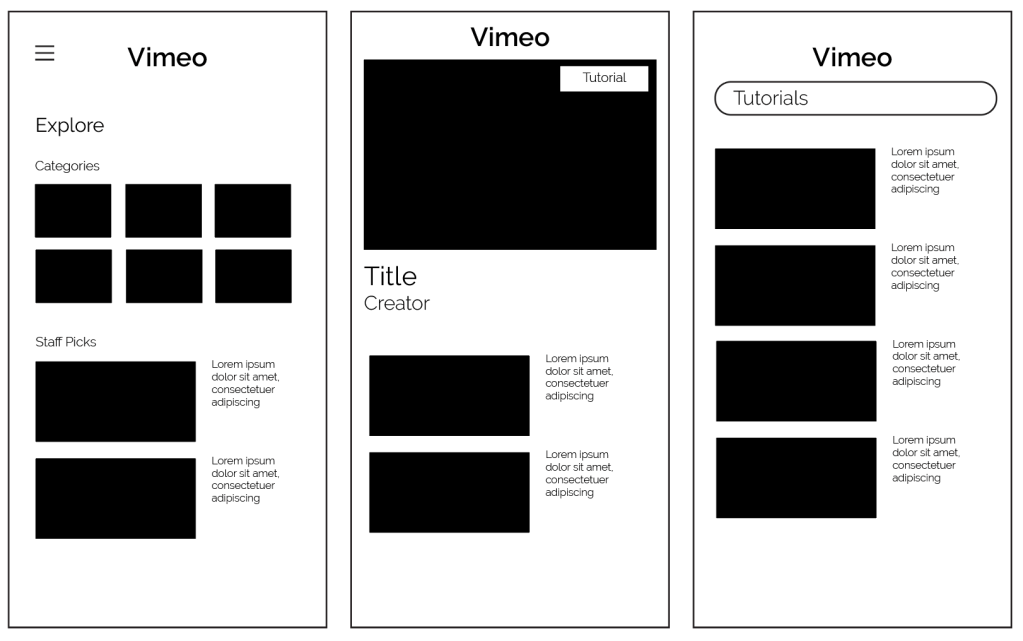
This was our initial sketches for the Vimeo Feature. As you can see in the first screen, it is the explore page offering different videos to watch. One of the categories will be a link to the tutorials page. In the second screen would be the screen when watching a video. In the top right-hand corner you can see a small pop-up tab representing a tutorial to one of the actions in the video. And finally the third screen would be the tutorials page, representing a wide range of tutorials to browse through.
High Fidelity Designs
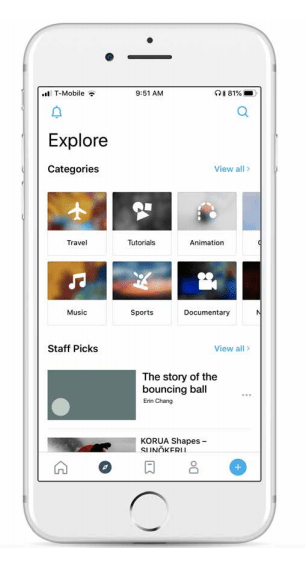
After our user testing using the low fidelity designs we decided to modify a few things slightly. We discovered that people were a little confused on the different ways of getting to tutorials, but putting them into the app itself helped to clear some of those issues up. We decided to keep both the tutorial page and the pop-up tutorials based on people’s different preferences. Like I said before, implementing our idea into the app really helped us solidify our design and ideas.
Prototype
https://marvelapp.com/d0g0ihe/screen/62918549
Retrospective
1. The most challenging aspect of this project was finding an idea and getting everyone in the group on the same page of how it would work. We really struggled in the beginning coming up with an idea. We starting by choosing an already existing app, Spotify, but didn’t give much thought into what exactly we were adding to it. So, we decided to abandon that idea and start from scratch. When brainstorming I brought up the fact that we should focus on something we are passionate about and that would be useful to us. Once we brainstormed with that in mind, we came up with our Vimeo idea. So, it took a little bit longer than expected but we were able to achieve the goal.
2. A valuable lesson I learned was the importance of delegating work. We all struggled with getting things done and I think if we would’ve delegated certain assignments we would have been more successful.
 PaytonAugusta